
Secure PDF Files With Random and Content-Based Passwords
AutoMassSecure™ Plug-in for Adobe® Acrobat®
- What is the AutoMassSecure™ Plug-in?
- AutoMassSecure™ is a plug-in for Adobe® Acrobat® software used to secure batches of PDF files with individual passwords. Both "Open Document" and "Permissions" passwords can be generated to password-protect PDF documents. The "Open Document" password requires readers to enter a password in order to open and read the document. The "Permissions" password is used for restricting access rights, such as limiting printing, editing or copying of the document content. The plug-in functionality is seamlessly integrated with the Adobe® Acrobat® application as a menu selection.
- How it Works?
- AutoMassSecure™ plug-in is designed to secure multiple PDF documents at once. The plug-in takes a folder or a set of selected PDF files as input. Every document is secured according to user-defined settings and protected with an individual password.
-
There are multiple methods for generating file "open" passwords for each input PDF document:
- Use a Filename-to-Password mapping table: use a custom filename-to-password correspondence table to match filenames to desired passwords. Use this method when filenames are fixed and well-known.
- Use a Keyword-to-Password mapping table: use a custom keyword-to-password correspondence table to assign passwords based on the presence of specific text. Use this method to assign passwords based on unique text strings such as employee IDs, social security numbers, account numbers, business names, etc.
- Search each document for a specific text pattern and use it as a password. Use this method if the desired password is located within the document itself. For example, an account or social security number, or email address etc.
- Use random password generators to automatically create unique high-strength passwords for each document. Use this method when maximum protection is required and passwords need to be hard to guess.
- Secured documents are saved into an output folder without overwriting the original documents. For each output document a record is added to the password file containing a time stamp, output file path and the password(s) generated. The password file can later be accessed by other applications to retrieve this information and perform all necessary processing.
Tutorials
- Getting Started
- Download Free Trial Version
- Buy software online
- System Requirements
Features Summary
- Process Multiple PDF Documents At Once
- The plug-in processes all PDF documents from the input folder or a selected set of files. Secured files are saved into an output folder without overwriting input files which are left unmodified. Output files can be renamed by adding a custom prefix and/or suffix.
- Secure Output Documents with Individual Passwords
-
You can limit the access to PDF files by setting passwords ("Open Document" and
"Access Permissions" passwords) and by restricting certain features, such as printing
and editing. If document has "Open Document" password set, then reader will be required to enter a password in order to open and read this document. All Adobe products enforce the restrictions set by the "Access Permissions"
password. However, because third-party products may not support or respect these
settings, document recipients may be able to bypass some or all of the restrictions
you set (such as ability to print or edit).
- Use Filename-to-Password Mapping Table
- Secure PDF documents by matching filenames to passwords using a user-specified mapping table. The mapping table is simply a list of filenames and corresponding passwords in the plain text format. Use this password-generation method if files have fixed and well known names.
- Here is an example of the filename-to-password mapping table:
-
Statement1.pdf,sai749kkl0!
Statement2.pdf,KLjd9900!
Statement3.pdf,&fdkjg*23h
AccountBalances.pdf,G8ks99LKK!
Payroll.pdf,Ujd92lkh00@5d
- Use Keyword-to-Password Mapping Table
- Secure PDF documents by matching keywords within document's text to the desired passwords. Use this method to assign passwords based on unique text such as social security number, employee ID, account number, company name etc.
- Here is an example of the keyword-to-password mapping table that associates 10 digit account numbers to passwords:
-
3097409372,sai749kkl0!
3097403340,KLjd9900!
3097456682,&fdkjg*23h
3097409200,G8ks99LKK!
3097445001,Ujd92lkh00@5d
- Search Documents For Passwords
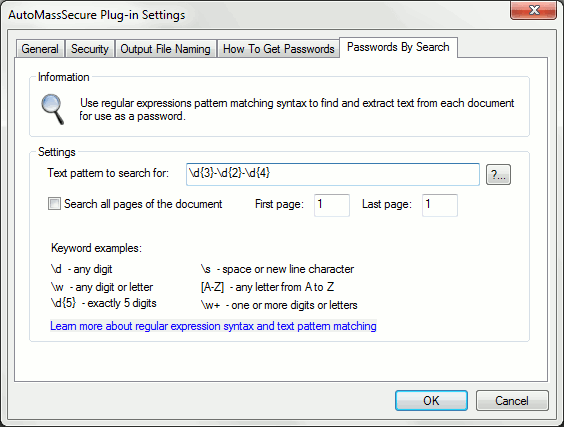
- Search each PDF document for a user-defined text pattern and use matching text as a password for securing corresponding file. This method allows using regular expressions to define text patterns.Regular expressions is a common way to search for patterns in text documents and provide a very powerful mechanism for extracting text. Use this method if a desired password is contained in the document itself. For example, account or social security number, email address, phone number, zip code and etc. Another technique is to put a desired password somewhere on the page of each document at the time it is generated.
- Save Password Data
- Processing information such as time stamp, output filename and associated access passwords) are saved into a password file for further processing by external applications. The plug-in allows the storing of data in either ASCII CSV or XML file formats (Sample password output: CSV and XML formats). Both output formats are widely used for data exchange and are readily supported by most database and spreadsheet applications.
- Encryption Strength
- The plug-in supports the following encryption methods:
-
- 128-bit RC4 (supported by Adobe Acrobat version 5 and up)
- 128-bit AES (supported by Adobe Acrobat version 7 and up)
- 256-bit AES (supported by Adobe Acrobat version 9 and up)
- Password Strength
- Use high-strength password type and password length of at least 8-10 characters to make your documents highly secure. Documents protected at such security level cannot be opened by password-cracking software in any reasonable amount of time. Longer passwords provide greater level of security protection. Passwords generated by the AutoMassSecure™ plug-in are resistant to dictionary and brute-force attacks. Key length attack cannot be used on 128-bit security data and is not applicable to PDF documents secured by the plug-in.
Random Password Generation
-
The plug-in supports several different options for generating random passwords of
variable length:
- 1. Pronouncable passwords that conform to FIPS-181 Standard
- Passwords generated by this method are easy to remember, but provide low security protection. Examples: etujkoka, irfvedmy, obgrevrawmu, addkiyou. Federal Information Processing Standards Publication 181 issued by the National Institute of Standards and Technology specifies Automated Password Generator algorithm to generate passwords for the protection of computer resources. The algorithm uses random numbers to select the characters that form the random pronounceable passwords. It produces passwords that are easily remembered, and entered into computer systems, yet not readily susceptible to automated techniques that have been developed to search for and disclose passwords. However, passwords generated by this method are not recomended for protecting of sensitive documents. They can be breaked within few days using modern software.
- 2. Pronouncable case-sensitive passwords
- This method uses FIPS-181 algorithm but also randomizes case of individual characters. These passwords are harder to remember than FIPS-181 and provide low-to-medium security protection. Examples: OaHidleINY, UKtroLziiCa, OaCdIsGeJ.
- 3. Variable length passwords that contain only ASCII characters (both lower and upper case) and digits
- This method randomly generates case-sensitive passwords by mixing English characters with digits (0-9). These passwords are hard to remember and provide medium-to-high level of security protection. Examples: pO6SYER866su0A, 6Ax4TROvHSm, xiQE72EPfsok.
- 4. Variable length passwords that contain ASCII characters (both lower and upper case), digits (0 - 9) and symbols
- This method randomly generates case-sensitive passwords by mixing English characters with digits (0-9) and symbols (symbols used: ~`!@#$%^&*()-_=+[{]}\|;:',<.>/? ). These passwords are very hard to remember and provide high level of security protection against automated password-breaking techniques. Examples: P8iEmD=/7zfjt?, 9A4eh3Q}p9n6, E5jRQ!wMBDsd*0.
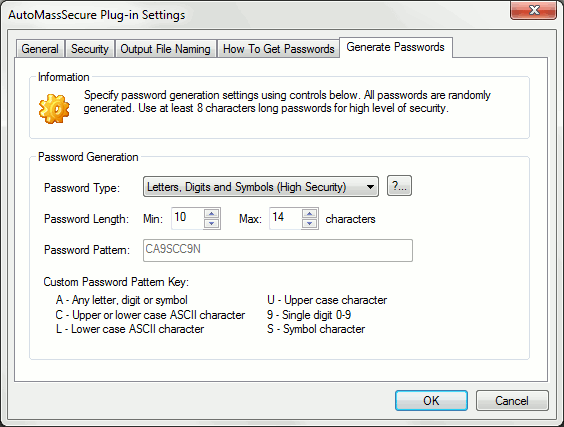
- 5. Passwords based on custom user-specified pattern
- Password pattern defines
what character type can appear in the specific position. This method randomly selects
a password length from a user specified range and repeats the password pattern to
create a password of the necessary length. This method provides great flexibility
in generating wide variety of passwords to satisfy custom security requirements.
Installation
- Download a free trial version of the plug-in to your computer. Double-click on an installation file and follow on-screen instructions. Once installation has been completed, launch Adobe® Acrobat® and select "Plug-ins > Secure Files..." menu to access AutoMassSecure™ plug-in functionality.
System Requirements
- Platforms:
 Microsoft® Windows 11/10/Windows 8/Windows Server 2012/2016/2019/2022.
- Software:
- Full version of Adobe® Acrobat® software is required - Acrobat Standard or Professional (32/64-bit versions 9, X, XI, 2015, 2017-2025, DC).
This software will not work with free Adobe Acrobat® Reader®.
Batch processing functionality requires presence of Adobe® Acrobat Professional®.
(Adobe Acrobat Product Comparison Chart).