
Convert PDF Portfolios into Regular PDF Documents
AutoPortfolio plug-in for Adobe® Acrobat®
- Email Conversion
- AutoPortfolio™ is a plug-in for Adobe® Acrobat® designed to convert emails and attachments into PDF format. The software works with PDF Portfolios that are widely used for storing and exporting emails from Microsoft Outlook and other email clients. The plug-in provides powerful functionality for managing emails stored in PDF portfolios:
-
- Converting portfolios into regular PDF files
- Extracting email file attachments and converting them into PDF format
- Exporting email metadata into Excel and HTML formats
- Converting portfolios for use in litigation support systems
- De-duplication of PDF file collections
- Converting EML files into PDF portfolio format
- Litigation Tools
Tutorials
- Step-by-Step Tutorials
-
- Converting PDF Portfolios
- How to Convert Outlook Email Folder Into a Single PDF Document (PDF)
 Video: How to Convert Outlook Emails Into a Single PDF Document
- Getting Started with AutoPortfolio (PDF)
- Convert a PDF Portfolio into a Single PDF Document (HTML version)
- Ordering and Selecting PDF Portfolio Records for Conversion
- Creating PDF Portfolios
- Exporting Emails from Outlook as PDF Portfolio File
- Creating PDF Portfolios from MSG Files
- Exporting Emails from Gmail Account into a PDF Portfolio File
- Converting EML Files into a PDF Portfolio
- Configuring Settings
- Configuring PDF Conversion Settings
- Configuring Excel-to-PDF Conversion Settings (multiple worksheets, fit-to-page)
- Configuring HTML-to-PDF and Text-to-PDF Conversion settings
- Extracting Files and Metadata
- Extract Files from PDF Portfolio
- Extract Emails from PDF Portfolio and Name Files using Dates
- Extract Metadata from a PDF Portfolio into a MS Excel Spreadsheet
- Convert a PDF Portfolio into TIFF and Text Format
- De-duplicating PDF Documents (Emails)
- Use Cases
-
- You have an email folder (in Outlook or any other email application) that was exported into a PDF Portfolio. Now you want to convert it into a single regular PDF with all attachments appended after corresponding emails for storing, printing or searching.
- Converting email folders from a Microsoft Outlook PST file into a single "regular" PDF document. Use this step-by-step visual guide for instructions.
- You have a PDF Portfolio, and want to extract all files and attachments into separate PDF files - whilst converting non-PDF attachments into PDF format, and appending them to the corresponding parent email/document.
- You have a set of PDF documents that you want to prepare for importing into a litigation support system (Concordance / Summation).
- You want to export metadata for a PDF Portfolio into a spreadsheet-ready file.
- You have a set of PDF files that you want to de-duplicate by removing documents with text contained in other documents.
- Exporting Bates numbers from a selected set of PDF files (not Portfolios) into a spreadsheet-ready file.
- Adding custom Bates numbers to a set of PDF files via a control file.
- Find and Delete Duplicate Pages within a PDF document.
- Convert EML message files into a PDF Portfolio while transferring all email metadata.
- Converting PDF Portfolios ↑top
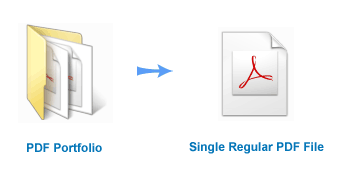
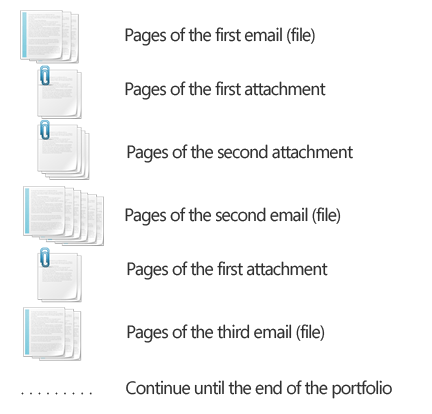
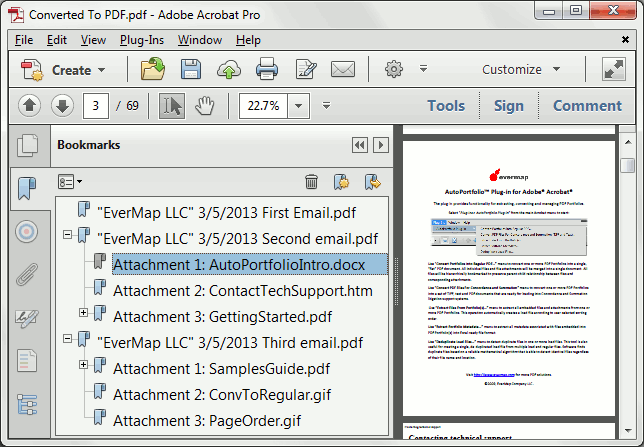
- The plug-in provides the ability to convert the content of one or more PDF Portfolios into a single "flat" PDF document. All embedded files and corresponding file attachments are merged together to create a regular PDF file. The beginning of each file is bookmarked (with additional child bookmarks pointing to file attachments). Non-PDF file attachments are optionally converted into PDF format. Attachments are merged at the end of the parent document.
- The plug-in allows the merging of regular PDF documents with page-level file attachments. File attachments are optionally converted into PDF format and appended to the end of their parent document.
- This operation is useful when it's necessary to apply Bates stamping to emails with non-PDF attachments. First, a portfolio with emails is converted into a single PDF document with attachments converted to PDF and appended to the end of the parent email. It is straight forward to stamp a single PDF document in Adobe Acrobat.
- Page order in the converted PDF file:
- Bookmarking Emails and Attachments ↑top
- The plug-in bookmarks the first page of each portfolio item (email) and each attachment to allow easy navigation. Each top-level item is bookmarked using text from a corresponding "Description" metadata field.
- Sorting and Filtering ↑top
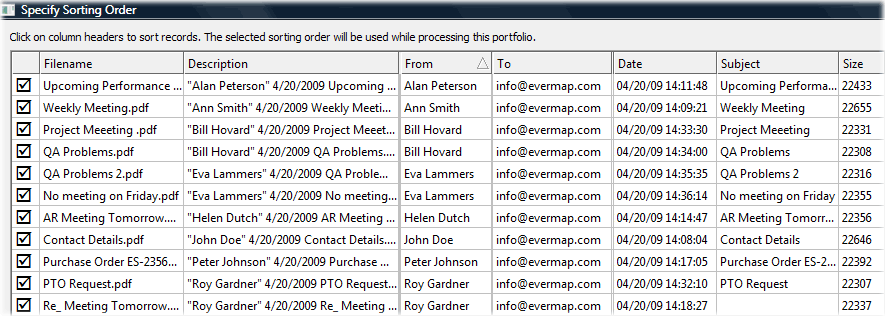
- The software provides sorting and filtering capabilities (see screenshot below) based on the embedded files' metadata. For example, embedded files from a PDF Portfolio that contains emails can be sorted based on the date received (or any other metadata field such as "From", "To", or "Subject" etc.) and then merged into a single output file, producing a regular PDF with all emails organized in chronological order.
-
- Processing of Multiple Files ↑top
- The plug-in provides an option for creating either a single output document (or a set of files, depending on the operation) for one or more input PDF portfolios, or to create a separate output for each input portfolio (all output files are placed into automatically created sub-folders). The second option provides a powerful ability to batch process a large number of input PDF portfolios (email archives for example) into separate output documents. Each email archive is converted into a separate PDF file and placed into a separate folder.
- Supported File Formats ↑top
- The plug-in uses existing file conversion filters installed in your copy of Adobe Acrobat to convert non-PDF files into a PDF format. If Adobe Acrobat can create a PDF file from a certain file format, then the plug-in will be able to convert it as well. Some file formats require the presence of corresponding software products on the same computer. For example, you need Microsoft Office Word installed on your computer in order to convert Microsoft Word documents (*.doc) into PDF format.
- Select Portfolio Items By Date ↑top
- The plug-in also provides a simple interface for selecting portfolio items based on a date range. This is a very useful operation for processing large email archives. Use this method to process/extract/convert all emails received between two dates.
- Selecting Portfolio Items By Search and Record Numbers ↑top
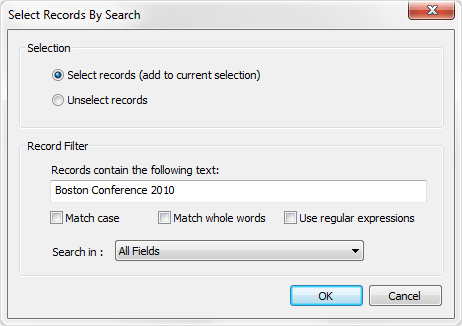
- The plug-in provides a powerful "select by search" method for selecting only those documents from a PDF Portfolio that contain a specific text or pattern. Use this feature to process only files that have a certain word(s) in a specific metadata field(s). For example, select only emails from "John Adams" or with "QA Problems" in a subject line. Another useful selection method is by record numbers. This is useful when it's necessary to process a large portfolio in smaller increments .
- Processing ZIP File Attachments ↑top
- The plug-in optionally extracts ZIP file attachments and converts all contained files into PDF. This capability makes handling ZIP file attachments completely transparent.
- Processing MSG File Attachments ↑top
- The plug-in extracts the content of MSG file attachments and converts them into PDF format on an individual basis (similar to the processing of ZIP archives). The MSG format is used by the Microsoft Outlook email program to save email messages as separate files.
- Custom Processing using Acrobat JavaScript ↑top
- The AutoPortfolio plug-in provides the ability to execute custom Acrobat JavaScript code on every PDF document contained in the input portfolio.
Acrobat JavaScript is a scripting language of Adobe Acrobat that is based on widely-used JavaScript language.
Acrobat JavaScript code can be optionally run on:- All top-level entries in a PDF portfolio
- All attachments that are in PDF format
- All attachments that are converted into PDF format
The custom scripts can be used to perform a variety of tasks on PDF documents:
- Adding custom text ("watermarks") to the document
- Placing stamps and annotations
- Adding cover pages by inserting pages from external PDF files
- Performing document processing based on metadata fields
- Saving documents into alternative locations
- Embedding metadata into individual PDF files
- Extract Embedded Files ↑top
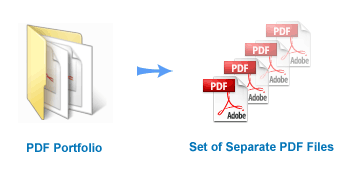
- Use this software to extract all embedded files (including file attachments) from one or more PDF Portfolios. Non-PDF file attachments are optionally converted into PDF format. The plug-in automatically creates a Casemap load file (a text file that lists all extracted files) based on the user-defined sorting order. Sorting and filtering capabilities allow the export of all or only a few selected files based on any existing metadata field.
- The plug-in can process regular PDF files with embedded files as well as PDF Portfolios (or PDF Packages). The HTML (with hyperlinks to extracted files) and CSV report files are generated automatically and include the following metadata: file name, description, size in bytes, creation and modification date/time, and MD5 checksum.
- Create Custom File Names From Metadata ↑top
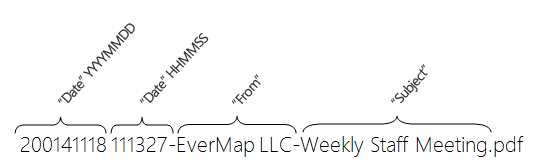
- Use metadata information to rename files and attachments. Combine static text and metadata values to create informative file names. Here is an example of using "Date", "From" and "Subject" fields to create a custom file name suitable for easy sorting in Windows Explorer:
- Extract Portfolio Metadata ↑top
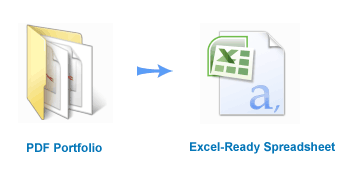
- The plug-in allows exporting of document metadata for many files at once without extracting files. The software supports two formats that can be easily imported into any spreadsheet application: text (CSV) and MS Excel XML files. Metadata includes any standard or custom fields such as file name, description, size in bytes, MD5 checksum, creation and modification date/time. If a PDF portfolio was created by Microsoft Outlook ("Convert To Adobe PDF" menu) email application, then each file might have the following metadata fields (specific to email): "Subject", "From", "To", "Cc", "Attachments", "Folder", "Received", "Importance", and "Sensitivity" etc.
- Export to Litigation Support Systems (Concordance and Summation) ↑top
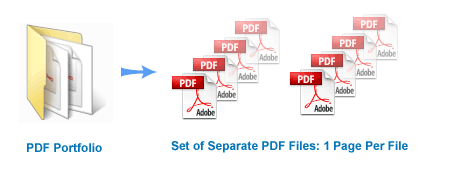
- Convert one or more PDF Portfolios for loading into litigation support systems such as Concordance, Summation, or Relativity. This operation outputs a set of TIFF, Text and PDF files, one output file for each PDF page. All interactive form elements such as buttons, fields, as well as annotations will be automatically flattened before converting to output text, image and PDF files. The plug-in creates separate Summation (*.DII), Opticon (*.LOG) and Casemap load files.
- Find and Delete Duplicate Pages ↑top
- Use this function to find and delete duplicate pages from a PDF document.
- The plug-in provides two different methods for identifying duplicate or near-duplicate pages:
- Comparing visual appearance of the pages as “images”.
- Comparing page text regardless of its visual appearance.
- The second method uses a different approach. It compares page content as text strings with options to ignore case and punctuation. If two pages contain the same sequence of words, then they are considered the same, regardless of the visual appearance and text location on the page. It is possible to use this method to find pages with similar, but not identical content by specifying a maximum allowed difference between two pages (in characters). Note that this method totally ignores any images or graphics that might appear on the page as well as text appearance properties such as font style, size and color.
- Deduplicate PDF Files ↑top
- The plug-in provides the functionality for checking a set of PDF files for duplicate and near-duplicate files. The software uses a combination of advanced methods to compare PDF documents and detect files that contain text from other documents. For example, a typical email thread may contain 20 different email replies - the last email containing all previous emails, making the rest of the documents redundant and able to be discarded. Detecting and discarding documents that are redundant allows the user to greatly reduce the number of documents/emails that need to be read during the electronic discovery process.
- Step-by-Step Tutorial: How to de-duplicate PDF files.
- Sorting and Filtering ↑top
- Record sorting capability allows the user to select a customised order for the embedded files while converting from Portfolio into PDF and other file formats. The plug-in also allow you to select only a subset of the embedded files based on either a manual selection or a search query.
- Skipping Duplicate Attachments ↑top
- The plug-in automatically skips duplicate attachments that are present within a single PDF document. This feature is handy when processing PDF Portfolios created by Adobe PDF Maker from Lotus Notes email. Every email attachment in such portfolios appears to be included twice: once in the header of the email and once in the body. Skipping such files speeds up processing and removes unnecessary duplicates in the output.
- Reporting ↑top
- The plug-in automatically generates processing reports in HTML and spreadsheet-ready CSV file formats. The processing report contains detailed information about each input portfolio, lists processed portfolio sub-documents and attachments, and provides file statistics and MD5 checksums.
- What is EML file format?
- It is the standard format used by Microsoft Outlook Express as well as some other email programs. Since EML files are created to comply with industry standard RFC 5322, EML files often encountered while working with emails from different sources. Emails from Gmail can be downloaded and saved into EML file format.
- Conversion into PDF Portfolio Format
- The Adobe Acrobat cannot convert EML messages into a PDF file format directly. The AutoPortfolio plug-in provides a function to convert one or more EML files into a single PDF Portfolio file. Each EML message is converted into a separate PDF document that is added to the output portfolio. All email attachments are transferred as file attachments of the corresponding PDF file. Each PDF document entry in the output portfolio is stored with associated metadata. The metadata fields include "To", "CC", "BCC", "From", "Subject", "Date", "Attachments".
- Overview
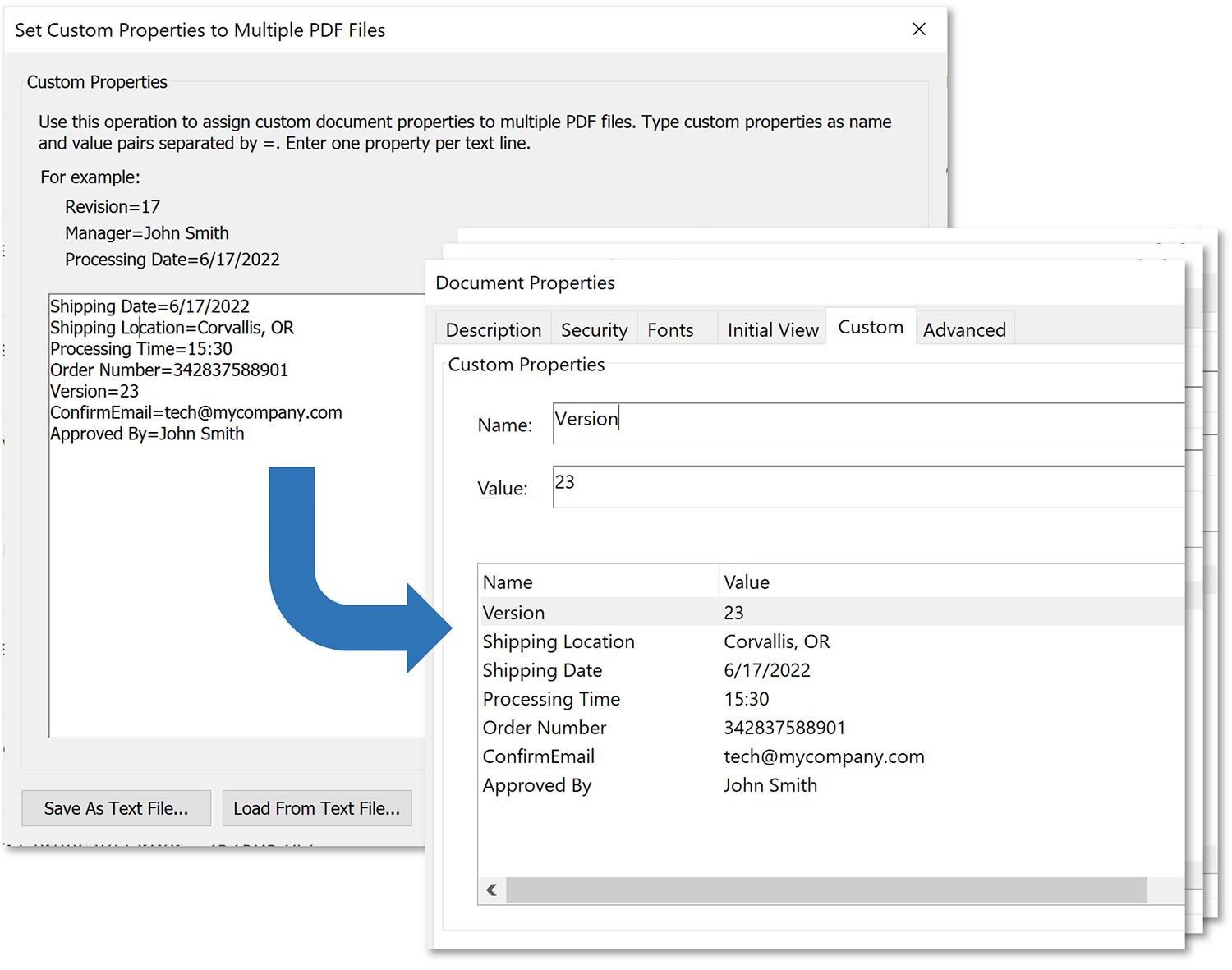
- AutoPortfolio provides a way to easily set custom document properties to multiple PDF files at once. Document properties (aka “document metadata”) is a common way to attach information to PDF files.
- Overview
-
Extract the following file properties for one or more PDF files or all files in one or more folders:
- Document filename with extension (for example: MyDocument.pdf)
- Full path to the document (for example: c:\Data\Projects\MyDocument.pdf)
- “Title” PDF metadata field
- “Subject” PDF metadata field
- “Author” PDF metadata field
- “Creator” PDF metadata field
- “Producer” PDF metadata field
- “Keywords” PDF metadata field
- PDF Version of the file (PDF file format version the document conforms to. For example: 1.6 )
- Page count
- Portfolio (Yes/No) - If corresponding document is a PDF portfolio, then the value is Yes, otherwise No.
- Number of document-level attachments
- Form (Yes/No) - If a corresponding document is a PDF form, then the value is Yes, otherwise No.
- XFA Form (Yes/No) - If corresponding document is a XFA form, then the value is Yes, otherwise No.
- Number of interactive fields (if a document is a PDF form, 0 otherwise)
- File size (in bytes)
- "Modified" date
- "Created" date
- Page size (for the first page of the document)
- Page rotation (for the first page of the document) - possible values: 0 degrees, 90 degrees, 180 degrees, 270 degrees.
- List of security restrictions. For example: "No document editing", "No printing", "No page inserting", "No bookmark editing" and etc.
- Output File Formats
-
- CSV (comma-delimited) text file (*.csv) - most widely used spreadsheet format.
- Tab-delimited text file (*.txt)
- Microsoft Excel XML Spreadsheet (*.xml)
- JSON Data File (*.json)
- HTML report (*.htm) - HTML report that can be viewed in any browser
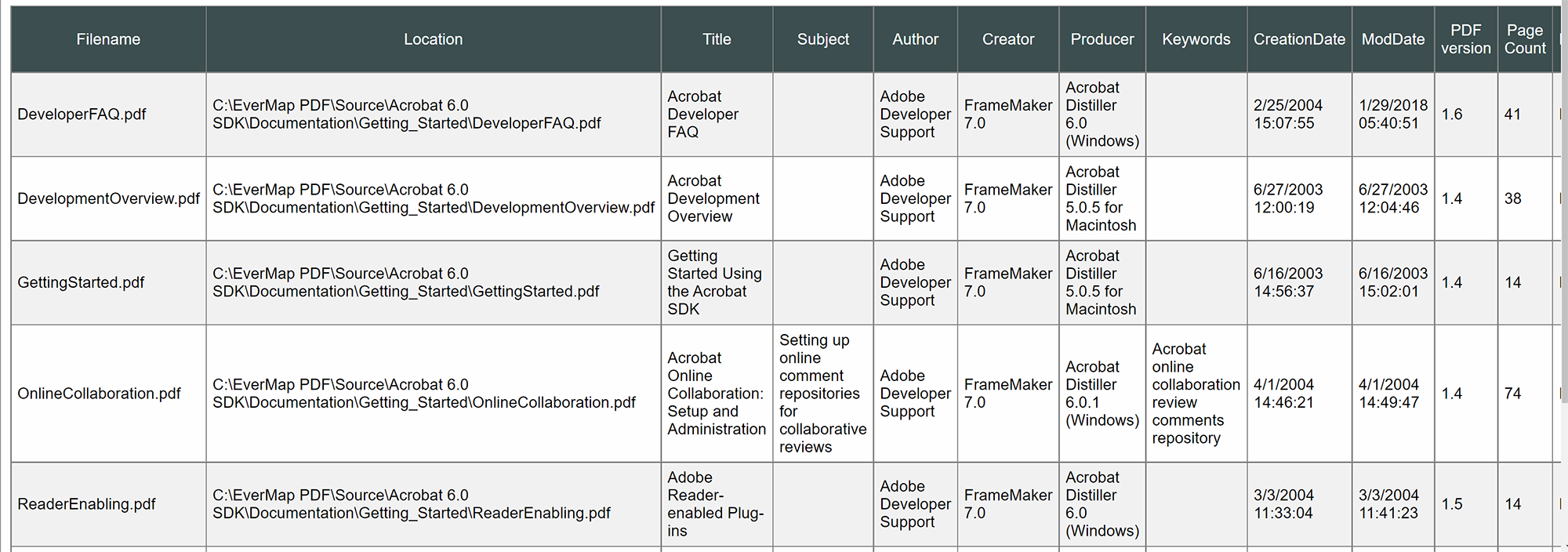
- Here is a sample of the file properties report in HTML format:
-
- Overview
-
Use this operation to stamp pages in one or
more PDF documents with corresponding filenames and/or metadata fields such as:
- File Name
- File counter (000001, 000002, 000003.. – sequential number of the file):
- Author
- Title
- Subject
- Keywords
- Creation Date
- Modification Date
- Creator
- Producer
- Any Custom Metadata Field
- Any Custom Text
- Text can be placed relatively to 5 reference positions on the page: upper left corner, upper right corner, bottom left corner, bottom right corner, and center of the page.
- Sample Output
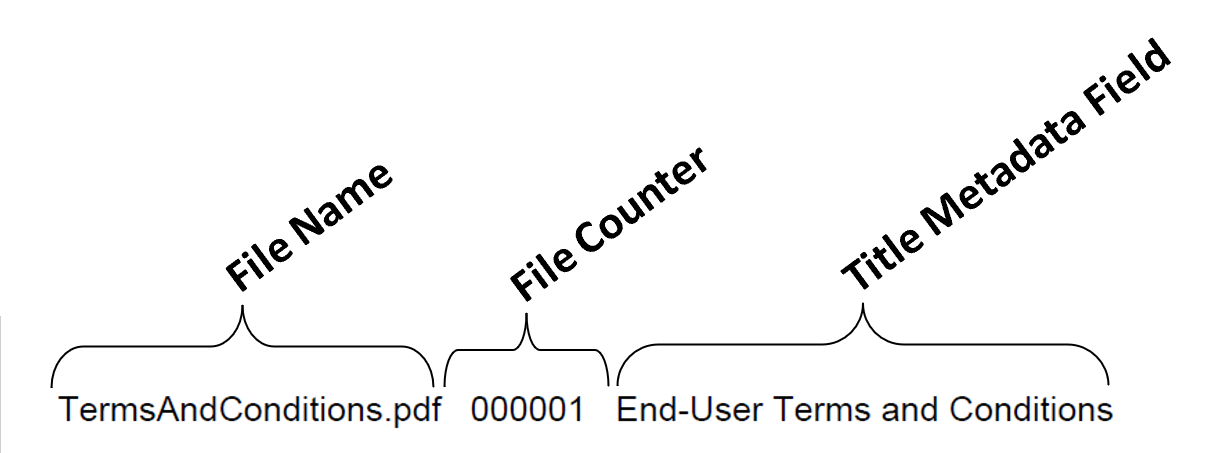
- Here is an example of the watermark added to the lower-bottom corner of the page. Watermark consists of 3 fields: filename, file counter and Title metadata field. The content, style and location of watermark can be fully customized by the user.
-
- What are Bates Numbers? ↑top
- Bates numbering (also called Bates stamping) is used in the legal industry as a method to label and identify legal documents, for easy identification and retrieval. A Bates number is a specially formatted, auto-incrementing number (and can be a combination of letters and digits) that is added to every page of the document to uniquely reference it. Nearly all American law firms use Bates numbering during the discovery phase of litigation, to reference and identify documents.
- Adding Custom Bates Numbers via a Control File ↑top
- Bates numbers can be added to a set of PDF files individually for each input PDF document via the use of a plain-text control file. Each input PDF document can be numbered using a different set of parameters.
- Extracting Bates Numbers Into Spreadsheets ↑top
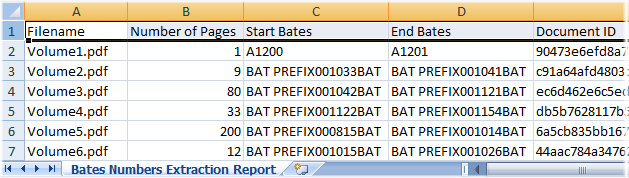
- The plug-in provides the functionality for extracting Bates numbers from a selected group of PDF documents (not PDF Portfolios) into a spreadsheet-ready CSV file. The output CSV file can be opened and edited by any spreadsheet application. The following information is extracted for every input PDF document: file name, number of pages, Bates number for a first page, Bates number for a last page, & Document ID. The software extracts Bates numbers that have been previously added to PDF documents using Acrobat's "Bates Numbering" operation.
- News Articles ↑top
- Read a TechnoLaywer NewsWire™ article by Neil J. Squillante: "Take a load off your email discovery chores" (download a printer-ready PDF version).
- About TechnoLawyer NewsWire™: ↑top
- TechnoLawyer NewsWire is a weekly newsletter that covers new products and services for law firms and legal departments. Thanks to an innovative structure, it serves lawyers and law office administrators who want a quick overview as well as those who want an in-depth analysis.
- Download and evaluate a 30-days unrestricted trial version of the plug-in.
- Platforms: ↑top
-
 Microsoft® Windows 11/10/Windows 8/Windows Server 2012/2016/2019/2022.
- Software: ↑top
-
Full version of Adobe® Acrobat® Professional software is required (versions 7, 8, 9, X, XI, DC, 2017);This
software will not work with free Adobe Acrobat® Reader®.
(Adobe Acrobat Product Comparison Chart). - PAD File
Functionality Overview
Extract Embedded Files and Metadata
Convert PDF Portfolios For Litigation Support Systems
Converting EML files into PDF Portfolio
Set Custom Document Properties to Multiple PDF Files
Extract File Properties from Multiple PDF Files
Stamp Pages with Filename and Metadata Fields
Bates Numbering
Press Coverage
Trial Version
System Requirements
AutoBookmarkCreate and edit PDF bookmarks, links & TOCAutoMailMergePopulate PDF forms from data filesAutoSplitSplit, merge and rename PDF filesAutoExtractExtract data from PDF into Excel filesAutoPortfolioLitigation Tools
Email-to-PDF ConversionAutoDocMailAutomatically email PDF documents via text searchAutoRedactRedact text and images in PDF documentsAutoBatchExecute Acrobat actions from command-line scriptsAutoPagexAdvanced page editing tools for Adobe AcrobatAutoMassSecureSecure PDF files with individual passwordsAutoInkWrite, draw and fill forms using pen inputAutoDocSearchSearch, Extract and Organize PDF files« It's $199 that is worth its weight in pdf's! I have been using AutoPortfolio plug-in for the past few days and it performs exactly as promised. The attachments are automatically bookmarked behind their parent emails. Bates numbering has been a cinch considering the volume I am working with. For those who use Summation/Concordance, it can format your output to meet your litigation software requirement. I am putting mine in a document library database and this has eliminated some unpleasants step. »Rhonda Frank
Contract Project Manager/Paralegal
QD Consultation Group