EverMap LLC provides document scanning and PDF processing services in efforts to drive your company towards a "paper-less office" and provide assistance with various PDF-related projects. We specialize in creating high-quality, navigable PDF document collections that require special attention by human experts. There is a big difference between a simple unorganized group of scanned PDF documents and fully-linked, bookmarked, searchable and indexed files that are tied together and ready to be posted on the Web/Intranet or burned on a CD/DVD. This requires a lot of expertise and special software. Our company eliminates the need to purchase and learn various software packages and provides a complete document processing workflow – from a paper document to an electronic collection of PDF documents.
Our services include:
- Document scanning from paper to PDF/TIFF
- Conversion of electronic documents to PDF format
- Making PDF files searchable with OCR and text indexing
- Adding navigation elements: bookmarks, table of content, hyperlinks, file indexes
- Custom document processing: splitting, merging, securing
- Transfering PDF collections to electronic media (CD/DVD)
Contact us at sales@evermap.com with your project details to get a quote.
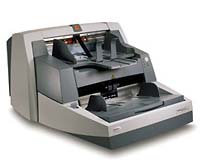
Best-rate basic scanning service includes:
- 7 ¢ per page flat-rate, no setup fees, minimum order $500
- High-speed scanning up to legal size (larger sizes extra)
- B&W, 200 DPI (higher DPI extra)
- Output format: PDF and/or TIFF
- Simple HTML or PDF file index
- Quality control: every page is inspected by operator
- Delivery on CD/DVD/Web
- Complex document preparation or indexing is extra
- Volume discounts available
Additional services:
- OCR and text indexing to make document searchable
- Bookmarking, text hyperlinking and etc.
- Document merging and splitting
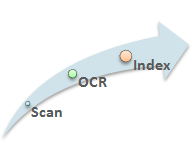
We can create 3 different types of PDF files: image-only, image and searchable text and text only. You would be able to view, print and search your documents using free Adobe Acrobat Reader software.
- OCR processing adds searchable text to scanned PDF documents
- Text indexing allows fast text searches across document collections
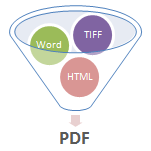
PDF documents can be created from the following file formats:
- Microsoft Office Word, Excel, PowerPoint and etc.
- TIFF and JPEG
- HTML
- XPS
- XML
- Text files
- Custom file format
- and more...
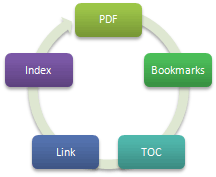
PDF documents are much easier to navigate and interact with when they contain a navigable table of contents (bookmarks). Their appearance can be altered to make them easy to find and organize by using hyperlinks and bookmarks to link to a different location in the open PDF file or even another PDF file.
- Add multi-level bookmarks
- Add hyperlinks to selected set of words and phrases
- Add cross-file links and file indexes
- Add table of contents to the document content
- Add named destinations for easy Web navigation
- Add navigation buttons to each page
- Split large files into multiple smaller files
- Merge multiple files into a single file or PDF Portfolio
- Create collapsible HTML index files
- Compress PDF files for better Web performance
- Secure multiple documents with unique or common passwords
- Convert regular PDF or paper documents into interactive PDF forms