
AutoDocMail plug-in for Adobe® Acrobat®
Automatically Email PDF Documents
- What is AutoDocMail™?
- AutoDocMail™ is a plug-in for Adobe® Acrobat® software for automatic distribution of PDF documents via e-mail. The recipients' email addresses are either extracted from a document’s text or assigned based on user-supplied “keyword-to-email” or “file name-to email” correspondence tables. Each PDF file will be delivered as an email attachment in a separate email message. There are options to: customize email message text ad subject line; password protect outgoing files with passwords extracted from document’s text; and attach additional files to each email. E-mail volumes of personalized PDF documents such as invoices, statements, reports and bills etc. Increase your productivity and save valuable time.
Tutorials
- Step-by-Step Tutorials and User Guides
-
- Getting Started
- Download Step-by-Step Getting Started Guide (PDF)
- Using AutoDocMail to Distribute PDF Files using Email Addresses Located Within Them
- File-to-Email Assignment Methods
- Assigning Emails by Text Search
- Using a Keywords-to-Emails Associations to Send Emails
- Using a Filenames-to-Emails Associations to Send Emails
- Password Protection
- Password-Protect Emailed Attachments Using the "Password" Keyword
- Using a Keyword-to-Password Mapping Table to Password-Protect Emailed Attachments
- Using a Filename-to-Password Mapping Table to Password-Protect Emailed Attachments
- Customizing Emails and Automation
- Customizing Email Messages and Subject Lines with Search Expressions
- Automating AutoDocMail via Action Wizard
- Emailing Methods
- Send Emails via Microsoft Outlook application
- Warning in Outlook: A program is trying to send an e-mail message on your behalf
- Troubleshooting Emailing via MS Outlook
- Using the SMTP E-mail Server to Distribute Documents
- Use 2-Step Verification to Send Emails via Gmail
- How to Delay Emailing in Microsoft Outlook
Functionality Overview
- How it works?
- The plug-in takes a list of PDF files as input and searches documents text, annotations and properties for email addresses and message subjects. If there are no email addresses in the document, they can assigned via keyword associations. The results of this search are presented to the user for review and editing. The user can add or remove recipients, and modify a message's subject or the content of each e-mail message. Once satisfied with the results, the user sends documents for distribution via e-mail. Outgoing documents can be optionally secured with a password with specific access permissions (such as editing and printing etc.). The plug-in maintains a message log that records a date, time, file name, and all recipients of each document / e-mail message.
-
- Use Cases
-
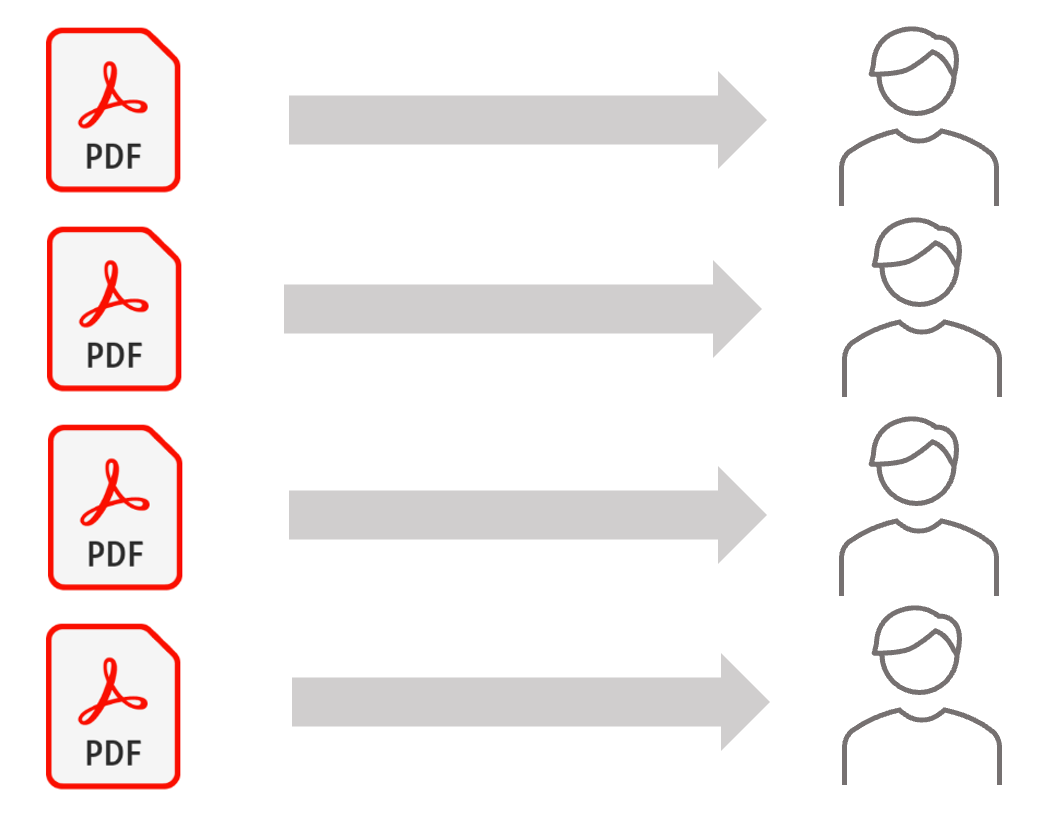
Use this software to automatically email files if you have:
- Multiple PDF documents that need to be delivered to different recipients.
- Single PDF document(s) that contains pages that need to be delivered to different recipients.
- Example 1: Distribute Invoices
- The software can take multiple PDF files that represent invoices and automatically search each file for an email addresses (including CC and BCC), and if an email address is found – email the file to the recipient.
- Example 2: Email Paystubs
- The software can take a single PDF file that contains multiple pay stubs (one page per stub), automatically split it into separate PDF files and send each file to the email address listed on each sub-document (pay stub).
- Example 3: Email Tax Forms
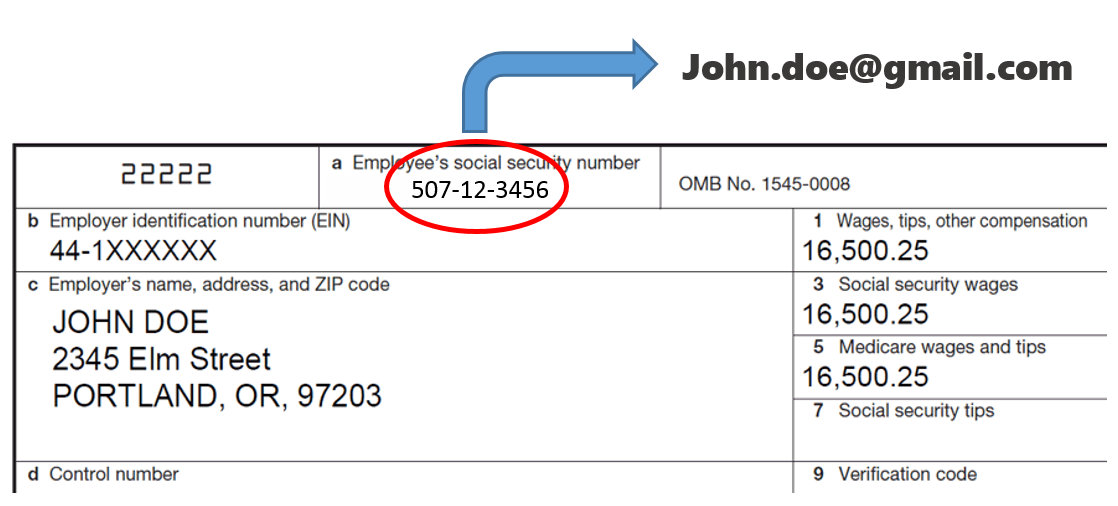
- The software can search a PDF file using a set of user-defined search keywords (for example social security numbers) and assign the corresponding email recipients. Use this method to assign emails based on account numbers, company names, customer IDs and other similar identifiers.
- Full Adobe Acrobat Integration
- The plug-in adds a "Plug-ins > Auto-Email Documents..." menu and a corresponding toolbar button to the Adobe Acrobat user interface. There is no separate application to launch - all functionality is fully integrated with the familiar Acrobat interface.
- Distribute Multiple Files At Once
- The plug-in takes multiple PDF files as input and automatically routes them to the correct recipients saving your valuable time and increasing your productivity. Distribute hundreds or thousands of PDF documents with simplicity of sending a single e-mail. Just select input files and the software will do the rest.
- Auto-Recognize E-mail Addresses
-
The plug-in automatically searches PDF documents for email addresses (including
"cc" and "bcc"), message subjects, custom names for the attachments and greeting
lines. A document's text, annotations and properties
can be searched for this information. Specify default e-mail recipients, message
text and subjects to automate document distribution.
Here is a typical example of a letter: 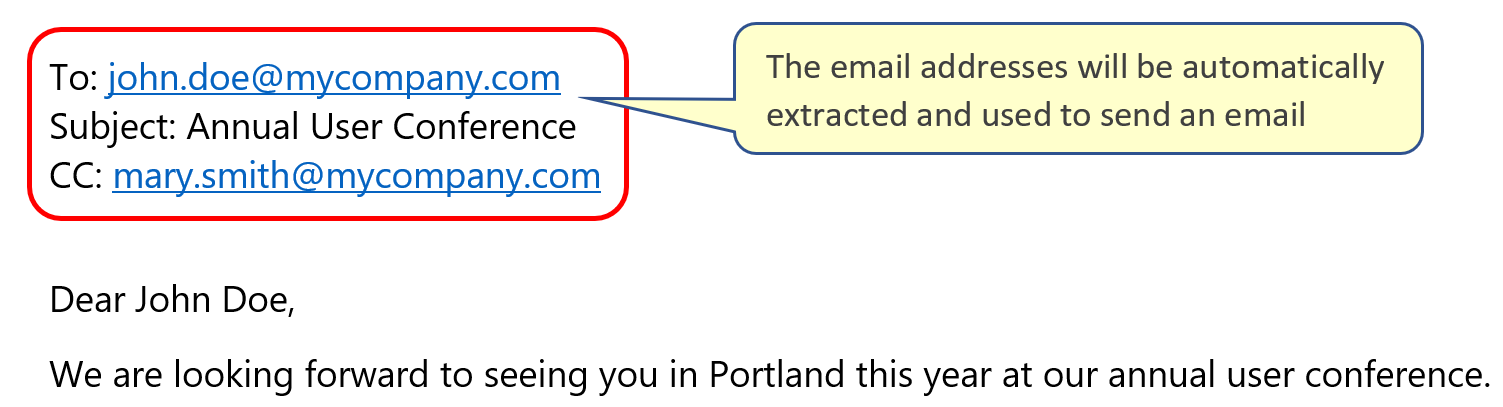
- Assign Keywords to Email Addresses
- Not every PDF document contains email address(es) or can have them easily added to the document’s text. This is where keyword-to-email mapping comes to the rescue. It is possible to associate custom keywords with destination email addresses and easily handle documents without printed emails. Use this method to assign emails based on company names, account numbers, SSNs, customer IDs, TINs, EINs, and other unique identifiers.
- Associate Filenames with Email Addresses
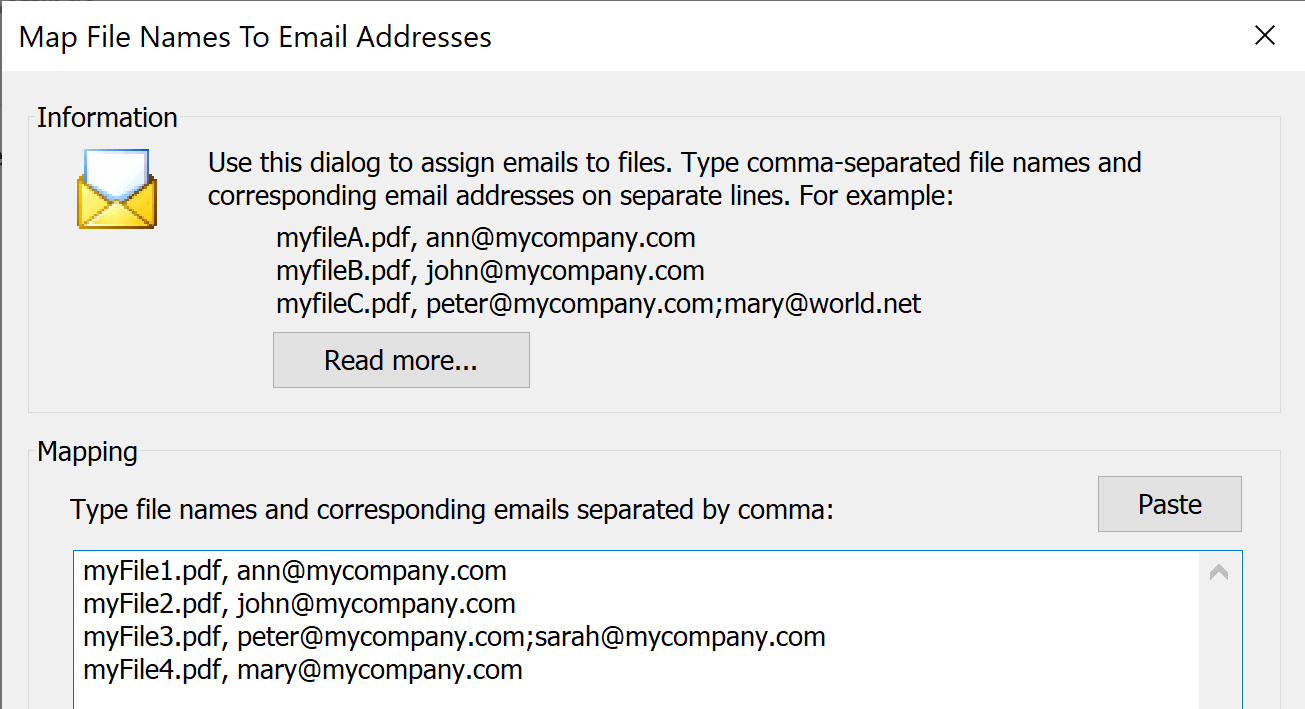
- The plug-in provides an option to determine a recipient for each outgoing file based on a
user-defined filename-to-email mapping.
Simply type in filenames and corresponding email addresses and the plug-in will do the rest.
- Block Specific E-mail Addresses
- The plug-in provides the ability to block certain e-mail addresses from being used. This feature is useful when documents contains certain e-mail addresses as a part of text which should be excluded from a recipient's list.
- Use Annotations to Designate E-mail Recipients
- Use text annotations to add e-mail recipients and message subjects to the PDF documents that do not contain this information as part of the text. Text annotations can be added using "Tools > Comments & Markup > Sticky Note" tool or using a "Typewriter" tool.
- Use Document Properties to Designate E-mail Recipients
- Use document properties to add e-mail recipients and message subjects to the PDF documents that do not contain this information as part of the text. Document properties can be assigned via "File > Properties..." menu.
- Customize Subject Line and Email Message
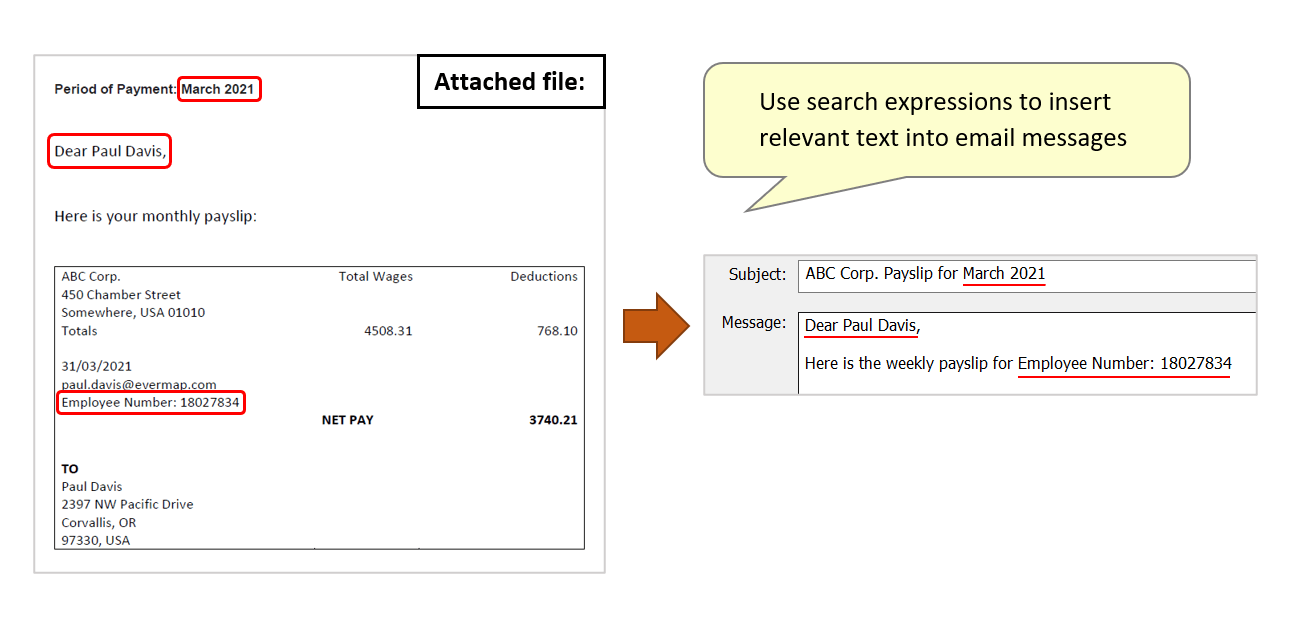
- Subject line and email message can be customized by extracting text from the PDF documents. This can be done in two different ways. The first method is to add special keywords to the document’s text such as subject: or greeting: to specify a custom subject line and a first line of each email. This method requires modifications to the documents that are being processed. The second method is more flexible and does not require any changes to the documents. It allows to search document for any custom text pattern or keyword (using regular expressions syntax) and insert extracted text anywhere in a subject line or a message body. This method can be used to extract account numbers, names, zip codes, time ranges, dates etc. to fully customize each email with information extracted from the corresponding PDF document.
- Automatically Split Files
- It is very common to have a single large document that contains many pages that need to go to a number of different recipients. For example, you may have a document that contains pay stubs for the whole company and you want to email each pay stub (1 page) to a correct person. The plug-in can optionally split an input document into a set of smaller files using a user-specified number of pages per file (1 page per file for the pay stub example). The software will handle this document as if it were a set of separate files. You will only need to add an email address (and a password) to each pay stub whilst generating it - most document management systems easily allow this. The plug-in optionally combines multiple sub-documents into a single file based on the recipient's email address.
- Review and Confirm Results
- Easily review, edit, and modify extracted email addresses; message text and subject; and preview PDF attachments before sending documents out to the recipients.
- Save Emails as EML Files
- Optionally, export ready-to-send emails as EML files. The saved messages can be emailed at a later time via Outlook or many other emailing applications that support EML file format.
- E-mail Support
- The software offers multiple different ways of sending e-mails: using your existing MAPI-enabled email application such as Microsoft Outlook or via SMTP Internet mail server. SMTP is the de facto standard for email transmissions across the Internet and provides functionality for sending volumes of e-mail messages without user interaction. The amount of the emails sent is subject to a daily quota from your email service provider.
- Managing Document Distribution Projects
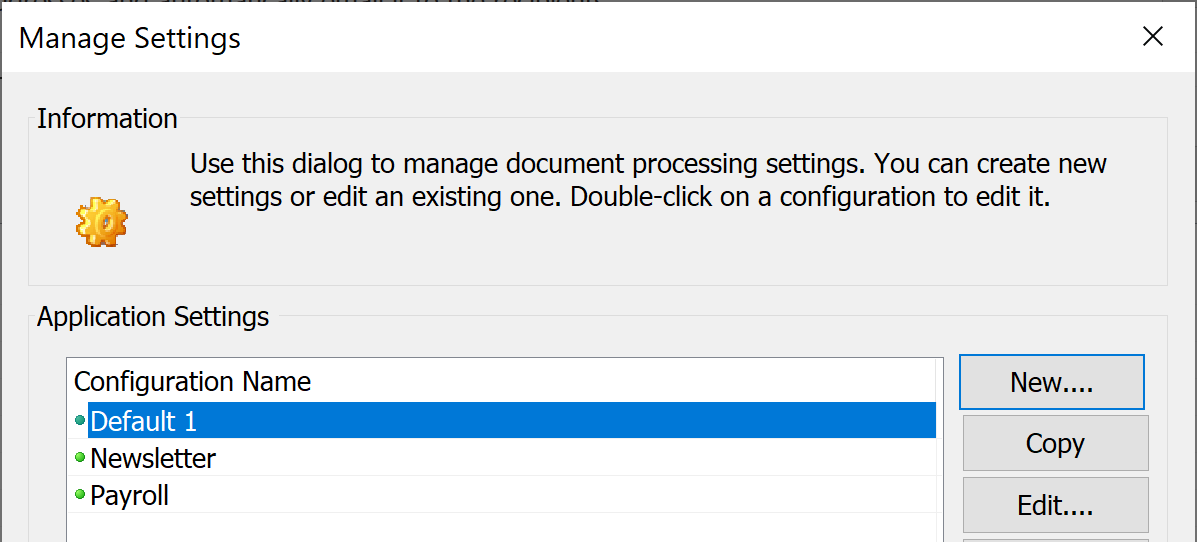
- The software provides the ability to create and use multiple configuration settings. Each configuration has its own name and contains all options and settings that are necessary to process and distribute documents. Using multiple configurations greatly simplifies managing different projects and reduces the time necessary to switch from one project to another.
-
- Password Protecting Document Distribution
- Any settings configuration can be optionally secured by a password. If a configuration is protected by a password, then the plug-in prompts the user to enter a password before processing documents or editing settings. Use password-protected configurations to limit access to document distribution to authorized users only.
- Use Gmail and Office365 to Send Documents
- You can configure the plug-in to use SMTP servers provided by Gmail or Office365 to send out documents. Please note that you have to comply with Gmail/Office365 end-user agreements and anti-spam policies.
- Pause Between Sending Emails
- The plug-in provides an option to pause for a user-specified number of seconds (0,1,3,5,10,15,20) between emails. This option is useful to avoid emails to be labeled as spam by SMTP email servers.
- Multiple Attachments
- Distribute more than a single file to each recipient using a list of default attachments that should be emailed to all recipients indiscriminately.
- Secure Outgoing Documents
- Optionally, secure outgoing PDF documents with a "document open" and "user permission" passwords. Restrict editing, printing and content extraction. Recipients will be required to enter a "document open" password in order to view its content. The plug-in provides 4 different forms of password protection:
-
- Use a single "global password" for all outgoing documents.
- Assign document-specific passwords by using a user-supplied keyword-to-password mapping table. Use this method to assign passwords based on account numbers, EINs, SSNs, phone numbers, and emails etc.
- Extract document-specific passwords from the text content using a "Password" keyword (for example: password: abc123).
- Extract document-specific passwords from document's metadata properties (use custom "Password" property).
-
The software supports 3 different encryption algorithms provided by PDF format:
- 128-bit RC4 (compatible with Acrobat 6.0 and up)
- 128-bit AES (compatible with Acrobat 7.0)
- 256-bit AES (compatible with Acrobat X.0 and up)
- Safety Checks
- The plug-in provides optional safety checks that prevent emailing documents with a page count and file size that are outside of the user-specified parameters.
- Message Log
- The plug-in records date, time, file name, and all recipients for each outgoing e-mail.
- Batch Processing Support
- The plug-in adds an "Auto-Email Document" batch command to the batch processing framework available in Adobe® Acrobat Professional® (Action Wizard tool). This command can be used to add "auto-email" functionality to any Action Wizard "action".
- Trial Version
- Download and evaluate a 30-days fully featured trial version of the plug-in. The only limitation of the plug-in is a "DEMO" watermark that is added to each page of outgoing PDF document if password-security is requested. Otherwise a trial version is absolutely identical to the full version of the plug-in.
- Security Statement
-
- The Software does not collect, store, nor transmit any user data outside of the user’s computer.
- All processing is performed locally on the user’s computer.
- There is no cloud processing involved.
- There is not any communication back to EverMap servers for any purpose.
- AutoDocMail does not need any access to user’s email system for reading emails. It provides functionality only for sending emails via locally installed copy of Microsoft Outlook, MAPI-compatible email clients or via user-supplied SMTP server.
- System Requirements
- Platforms:
-
 Microsoft® Windows 11/10/Windows 8/Windows Server 2012/2016/2019/2022.
- Software:
-
Full version of Adobe® Acrobat® software is required - Acrobat Standard or Professional (32/64-bit versions 9, X, XI, 2015, 2017-2025, DC).
This software will not work with free Adobe Acrobat® Reader®.
Batch processing functionality requires presence of Adobe® Acrobat Professional®.
(Adobe Acrobat Product Comparison Chart).